Mon Blog
Sauvegarder WordPress sur Amazon S3 avec UpdraftPlus (guide simple)
Sauvegarder son site WordPress est indispensable. Une erreur, une mise à jour ratée ou un piratage peuvent faire disparaître un site en quelques secondes.
Le plugin UpdraftPlus permet de sauvegarder automatiquement WordPress vers un espace sécurisé comme Amazon Web Services S3.
Lors de la configuration, Amazon affiche des messages de sécurité qui peuvent sembler inquiétants. Ce guide explique quoi choisir et pourquoi, sans jargon technique.
Pourquoi Amazon affiche des avertissements ?
Amazon recommande d’éviter certaines méthodes de connexion dans des contextes très spécifiques, par exemple quand un site est hébergé directement chez Amazon.
👉 Pour un site WordPress classique, ces avertissements sont normaux et sans danger.
Si votre site est hébergé chez :
- un hébergeur mutualisé
- un VPS
- un serveur dédié
- un hébergeur européen classique
alors la méthode proposée est la bonne.
Quel choix faire lors de la création de la clé Amazon ?
Lors de la création d’une clé d’accès, Amazon demande à quoi elle va servir.
Choix correct :
Application exécutée en dehors d’AWS
Pourquoi ?
- WordPress n’est pas hébergé chez Amazon
- UpdraftPlus est un plugin externe
- Il a simplement besoin d’envoyer des fichiers de sauvegarde
C’est exactement ce cas d’usage.
👉 Ce choix n’affaiblit pas la sécurité et n’a aucun impact négatif.
Comment fonctionne la sauvegarde (schéma simple)
Votre site WordPress
└─ Plugin UpdraftPlus
└─ Coffre-fort Amazon S3 (privé)
Vos sauvegardes sont stockées en ligne, en sécurité, hors de votre site.
Étape 1 – Créer un espace de sauvegarde Amazon S3
Bonnes pratiques :
- Espace privé (non accessible au public)
- Dédié uniquement aux sauvegardes
- Nom clair, par exemple :
sauvegardes-wordpress
Aucune connaissance technique n’est requise ici.
Étape 2 – Créer un accès dédié pour UpdraftPlus
Il est très important de :
- ❌ ne pas utiliser le compte principal Amazon
- ❌ ne pas réutiliser une clé existante
Créez un accès uniquement pour les sauvegardes WordPress.
Exemple de nom :
updraftplus-wordpress
Cela limite les risques en cas de problème.
Étape 3 – Donner uniquement les droits nécessaires
UpdraftPlus a besoin de :
- envoyer des fichiers
- lire des fichiers
- supprimer des anciens fichiers
Rien de plus.
Cette restriction empêche tout accès à d’autres données Amazon.
Étape 4 – Récupérer la clé et la renseigner dans WordPress
Amazon vous fournit :
- une clé d’accès
- une clé secrète
Dans WordPress :
- Réglages → UpdraftPlus → Réglages
- Choisir Amazon S3
- Renseigner les informations demandées
- Choisir la région (Europe, Paris, etc.)
- Enregistrer
Tester la sauvegarde
Cliquez sur :
- Tester les réglages
- Puis lancez une sauvegarde manuelle
Vérifiez que les fichiers apparaissent bien dans Amazon S3.
Conseils simples pour plus de sécurité
Supprimer automatiquement les anciennes sauvegardes
Par exemple :
- garder 14 jours de sauvegardes quotidiennes
- garder 6 mois de sauvegardes mensuelles
Cela évite des coûts inutiles.
Chiffrement automatique
Amazon chiffre les fichiers automatiquement.
Aucune action n’est nécessaire.
Erreurs fréquentes à éviter
- Utiliser le compte principal Amazon
- Donner trop de droits
- Oublier de tester la sauvegarde
- Stocker les sauvegardes sur le même serveur que le site
En résumé
✔ Les clés d’accès Amazon sont normales pour WordPress
✔ Le choix “Application exécutée en dehors d’AWS” est le bon
✔ Cette méthode est fiable et largement utilisée
✔ Une sauvegarde externe peut sauver votre site
Bitcoin et la « cyclicité » : mythe rassurant ou analyse sérieuse ?
Depuis plusieurs années, une grande partie du discours autour du Bitcoin repose sur une idée centrale : la cyclicité.
Halving, cycles de quatre ans, bull run « inévitable », bear market tout aussi attendu. Le récit est bien huilé, presque confortable.
Mais une question mérite d’être posée franchement :
Peut-on vraiment parler d’analyse sérieuse quand on attend un phénomène supposé téléphoné et prévisible ?
Ce que les partisans de la cyclicité avancent
Les défenseurs de cette vision s’appuient principalement sur trois éléments :
- Les données historiques : depuis 2012, les grandes phases haussières ont suivi les halvings.
- La raréfaction programmée : la réduction de l’émission est censée mécaniquement influencer le prix.
- La répétition des comportements humains : euphorie, excès, correction, oubli, puis retour.
Pris isolément, ces éléments ne sont pas absurdes. Le problème commence quand ils sont présentés comme un mécanisme quasi déterministe.

Là où le raisonnement devient fragile
1. Un échantillon statistique ridiculement faible
Bitcoin existe depuis un peu plus de quinze ans.
Parler de cycles robustes sur trois ou quatre occurrences relève plus de la narration que de la science.
En finance, on ne qualifierait jamais cela de série temporelle exploitable à haut niveau de confiance.
2. La confusion entre corrélation et causalité
Que des hausses aient suivi des halvings ne prouve pas que :
- le halving en est la cause principale,
- ni que cela se reproduira à l’identique.
Le marché de 2013, celui de 2017 et celui de 2021 n’ont rien à voir en termes de liquidité, d’acteurs, de régulation ou de macroéconomie.
3. Une prophétie auto-réalisatrice
Plus une idée est répétée, plus elle influence les comportements.
- Les investisseurs achètent « avant le halving »
- Les médias amplifient le récit
- Les flux se synchronisent
Le cycle devient alors un artefact social, pas une loi de marché.
Cela fonctionne… jusqu’au jour où cela ne fonctionne plus.
L’analyse technique : outil ou illusion de contrôle ?
L’analyse technique n’est pas inutile en soi. Elle est efficace pour :
- lire le comportement collectif,
- identifier des zones de liquidité,
- gérer le risque à court ou moyen terme.
Mais elle ne transforme pas un actif aussi jeune, politique et narratif que le Bitcoin en métronome prévisible.
Croire l’inverse, c’est confondre lecture du passé et capacité de prévision.

Ce que le Bitcoin est réellement
Bitcoin n’est pas :
- une action avec des flux de trésorerie,
- une matière première classique,
- un actif mûr.
C’est à la fois :
- un objet technologique,
- un actif monétaire expérimental,
- un symbole idéologique,
- un terrain de spéculation mondiale.
Réduire cela à une simple courbe cyclique est intellectuellement confortable, mais analytiquement pauvre.
Alors, être sceptique est-il une erreur ?
Non.
Être sceptique face à une cyclicité présentée comme évidente, c’est au contraire :
- refuser les récits trop propres,
- éviter les certitudes paresseuses,
- garder une posture d’analyse ouverte.
Le vrai danger n’est pas de douter des cycles.
Le vrai danger, c’est de les prendre pour des lois naturelles.
Conclusion
La cyclicité du Bitcoin est un récit utile, parfois opérant, mais jamais garanti.
Elle aide à structurer des attentes, pas à prédire l’avenir.
Dans un marché aussi jeune et mouvant, la seule position vraiment rationnelle reste la prudence intellectuelle.
Le jour où le cycle « évident » échoue, ce ne sera pas une anomalie.
Ce sera simplement le marché qui rappelle qu’il ne doit rien à nos graphiques.
SIPO et PISO : étendre les entrées/sorties d’Arduino et ESP proprement
Quand on travaille avec Arduino, ESP8266 ou ESP32, on se heurte vite à une limite simple : le nombre de GPIO disponibles.
Plutôt que d’empiler des cartes ou de bricoler des multiplexeurs douteux, il existe une solution simple, robuste et industrielle : les registre à décalage.
Deux familles dominent :
- SIPO (Serial In / Parallel Out)
- PISO (Parallel In / Serial Out)
Pourquoi utiliser des registres à décalage ?
- Économiser des GPIO
- Simplifier le câblage
- Chaîner plusieurs circuits
- Compatible Arduino / ESP / Raspberry Pi
- Très utilisé en industrie, domotique, vending machines, LED panels
👉 3 broches suffisent pour piloter 8, 16, 32 sorties ou entrées.
SIPO – Serial In, Parallel Out

Principe
Tu envoies les données bit par bit en série, et le circuit les expose en parallèle sur ses sorties.
Circuit le plus courant
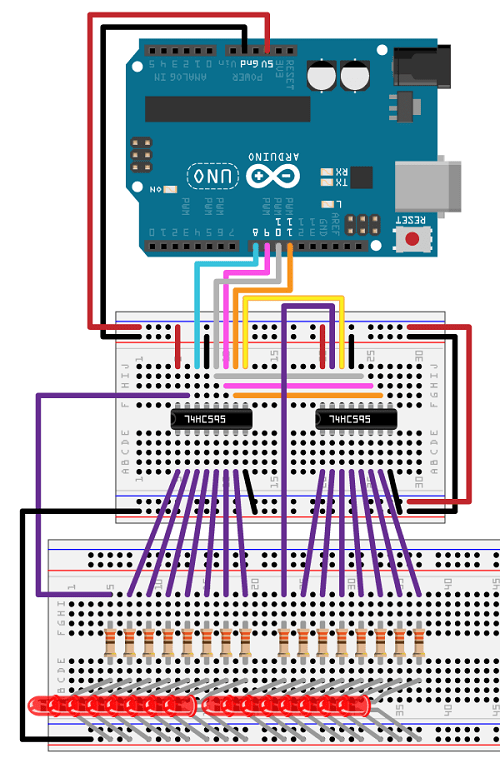
74HC595
- 8 sorties digitales
- Chaînable à l’infini
- Très stable jusqu’à plusieurs MHz
Broches clés
| Broche | Rôle |
|---|---|
| DS | Donnée série |
| SH_CP | Clock (shift) |
| ST_CP | Latch |
| Q0–Q7 | Sorties |
| OE | Enable (optionnel) |
| MR | Reset (optionnel) |
Exemple Arduino – piloter 8 LEDs
int dataPin = 11;
int clockPin = 13;
int latchPin = 10;
void setup() {
pinMode(dataPin, OUTPUT);
pinMode(clockPin, OUTPUT);
pinMode(latchPin, OUTPUT);
}
void loop() {
digitalWrite(latchPin, LOW);
shiftOut(dataPin, clockPin, MSBFIRST, B10101010);
digitalWrite(latchPin, HIGH);
delay(500);
}
Cas d’usage SIPO
- LEDs
- Relais
- MOSFETs
- Afficheurs 7 segments
- Panneaux lumineux
- Cartes de puissance
PISO – Parallel In, Serial Out

Principe
Tu lis plusieurs entrées simultanément, puis tu récupères leur état en série.
Circuit classique
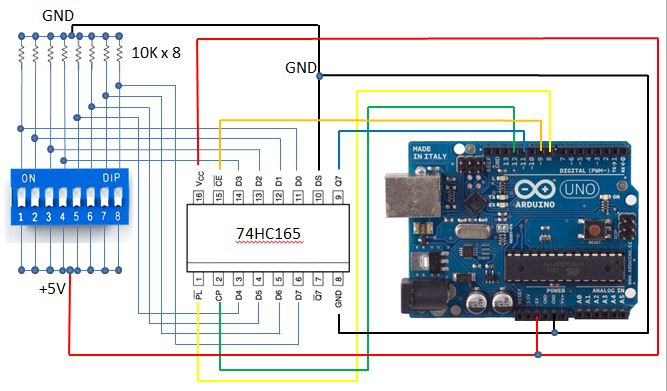
74HC165
- 8 entrées digitales
- Lecture rapide et fiable
- Chaînable comme le 74HC595
Broches clés
| Broche | Rôle |
|---|---|
| PL | Parallel Load |
| CP | Clock |
| Q7 | Sortie série |
| D0–D7 | Entrées |
Exemple Arduino – lire 8 boutons
int loadPin = 8;
int clockPin = 12;
int dataPin = 11;
void setup() {
pinMode(loadPin, OUTPUT);
pinMode(clockPin, OUTPUT);
pinMode(dataPin, INPUT);
}
byte readInputs() {
digitalWrite(loadPin, LOW);
delayMicroseconds(5);
digitalWrite(loadPin, HIGH);
return shiftIn(dataPin, clockPin, MSBFIRST);
}
void loop() {
byte state = readInputs();
}
SIPO vs PISO – comparaison directe
| Critère | SIPO (74HC595) | PISO (74HC165) |
|---|---|---|
| Fonction | Sorties | Entrées |
| GPIO utilisés | 3 | 3 |
| Chaînable | Oui | Oui |
| Vitesse | Très élevée | Très élevée |
| Usage typique | LEDs, relais | Boutons, capteurs |
Arduino vs ESP : points d’attention
Arduino (5V)
- Compatible direct avec HC / HCT
- Tolérant
- Simple
ESP8266 / ESP32 (3.3V)
- Utiliser 74HCT ou alimenter en 3.3V
- Attention aux niveaux logiques
- Éviter OE/MR flottants
👉 En pratique : 74HC fonctionne souvent, mais ce n’est pas garanti à 100%.
Chaînage : scaler sans limite
- Q7’ → DS pour les SIPO
- Q7 → DS pour les PISO
- Même clock, même latch
- 8 bits par circuit
Exemple :
- 4 × 74HC595 = 32 sorties
- 2 × 74HC165 = 16 entrées
Alternatives modernes
| Composant | Type | Avantage |
|---|---|---|
| MCP23017 | I²C GPIO | Interruptions |
| PCF8574 | I²C GPIO | Ultra simple |
| TLC5940 | PWM LED | Dimming précis |
| ULN2003 | Driver | Puissance |
👉 Mais SIPO/PISO reste imbattable pour la simplicité et la robustesse.
Quand utiliser SIPO / PISO ?
✅ Tu veux :
- réduire le câblage
- garder un timing maîtrisé
- éviter I²C / SPI complexes
- faire du hardware fiable
❌ Évite si :
- besoin d’analogique
- besoin d’interruptions par pin
- besoin de retours d’état complexes
Conclusion
Les registres SIPO et PISO sont des briques fondamentales de l’électronique embarquée.
Ils sont simples, rapides, économiques et parfaitement adaptés à Arduino et ESP.
Si tu construis :
- une carte maison
- un automate
- un distributeur
- une domotique custom
AliExpress Bundle Bypass Browser Plugin
Marre des “Bundle Deals” AliExpress qui vous forcent à acheter plusieurs articles ? Ce script gratuit intercepte ces liens et vous redirige directement vers la page produit individuelle.
Le problème des Bundle Deals
AliExpress pousse de plus en plus les acheteurs vers des “Bundle Deals” — des offres groupées qui semblent attractives mais vous empêchent d’acheter un seul article au prix unitaire. Quand vous cliquez sur un produit depuis les résultats de recherche, vous atterrissez sur une page intermédiaire qui vous force à ajouter d’autres articles.
Le lien ressemble à ça :
aliexpress.com/ssr/300000512/BundleDeals2?productIds=1005008154245742...
Au lieu du lien direct vers le produit :
aliexpress.com/item/1005008154245742.html
La solution : AliExpress Bundle Bypass
Ce userscript détecte automatiquement les liens “Bundle Deals” et les convertit en liens directs vers la page produit. Plus besoin de chercher comment contourner ces pages, le script fait tout le travail.
Fonctionnalités
- Redirection automatique — Si vous atterrissez sur une page Bundle, vous êtes immédiatement redirigé vers le produit
- Conversion des liens — Les liens Bundle dans les résultats de recherche sont réécrits en temps réel
- Interception des clics — Même si un lien n’a pas été converti, le clic est intercepté et redirigé
- Panel de debug — Un indicateur visuel montre combien de liens ont été détectés et convertis
- Indicateurs visuels — Les liens convertis sont entourés en vert pour confirmation
Installation
Le script fonctionne avec un gestionnaire de userscripts. Voici comment l’installer selon votre navigateur :
🟡 Google Chrome
- Installez l’extension Tampermonkey depuis le Chrome Web Store
- Cliquez sur l’icône Tampermonkey dans la barre d’extensions
- Sélectionnez “Create a new script…”
- Supprimez le contenu par défaut
- Collez le code du script (voir ci-dessous)
- Appuyez sur Ctrl+S pour sauvegarder
- Rafraîchissez AliExpress — le panel debug doit apparaître en haut à droite
🟠 Mozilla Firefox
- Installez l’extension Violentmonkey ou Greasemonkey depuis les modules Firefox
- Cliquez sur l’icône de l’extension
- Cliquez sur le “+” pour créer un nouveau script
- Collez le code du script
- Sauvegardez avec Ctrl+S
- Testez sur AliExpress
🔵 Microsoft Edge
- Installez Tampermonkey pour Edge depuis le Microsoft Edge Add-ons store
- Cliquez sur l’icône Tampermonkey
- Sélectionnez “Create a new script…”
- Collez le code et sauvegardez
🦁 Brave Browser
Brave est basé sur Chromium, la procédure est identique à Chrome. Installez Tampermonkey depuis le Chrome Web Store (compatible avec Brave).
Le code du script
Copiez l’intégralité du code ci-dessous :
// ==UserScript==
// @name AliExpress Bundle Bypass
// @namespace https://github.com/mehdi
// @version 3.1.0
// @description Bypass bundle deals and go directly to product pages
// @author Mehdi
// @match *://*.aliexpress.com/*
// @match *://*.aliexpress.ru/*
// @match *://*.aliexpress.us/*
// @grant GM_addStyle
// @run-at document-end
// ==/UserScript==
(function() {
'use strict';
const processedLinks = new WeakSet();
let isScanning = false;
let scanTimeout = null;
let scannedCount = 0;
let foundCount = 0;
let convertedCount = 0;
// Debug panel
function createDebugPanel() {
const panel = document.createElement('div');
panel.id = 'bundle-bypass-debug';
panel.innerHTML = `
<div style="
position: fixed;
top: 10px;
right: 10px;
background: #1a1a2e;
color: #0f0;
font-family: monospace;
font-size: 12px;
padding: 10px 15px;
border-radius: 8px;
z-index: 999999;
max-width: 350px;
box-shadow: 0 4px 20px rgba(0,255,0,0.3);
border: 1px solid #0f0;
">
<div style="font-weight: bold; margin-bottom: 8px; color: #0ff;">
⚡ BUNDLE BYPASS v3.1
</div>
<div id="bb-status">Active ✓</div>
<div id="bb-stats" style="margin-top: 8px;">
Scanned: <span id="bb-scanned">0</span> |
Bundles: <span id="bb-found">0</span> |
Fixed: <span id="bb-converted">0</span>
</div>
<button id="bb-close" style="position: absolute; top: 5px; right: 10px; background: none; border: none; color: #f00; cursor: pointer;">✕</button>
</div>
`;
return panel;
}
function updateStats() {
const el1 = document.getElementById('bb-scanned');
const el2 = document.getElementById('bb-found');
const el3 = document.getElementById('bb-converted');
if (el1) el1.textContent = scannedCount;
if (el2) el2.textContent = foundCount;
if (el3) el3.textContent = convertedCount;
}
// Redirect if on bundle page
const currentUrl = window.location.href;
if (currentUrl.includes('BundleDeals')) {
const match = currentUrl.match(/productIds=(\d+)/);
if (match) {
window.location.replace(`https://www.aliexpress.com/item/${match[1]}.html`);
return;
}
}
function extractProductId(url) {
let match = url.match(/productIds=(\d+)/);
if (match) return match[1];
match = url.match(/x_object_id[%3A:]+(\d+)/i);
if (match) return match[1];
return null;
}
function scanLinks() {
if (isScanning) return;
isScanning = true;
document.querySelectorAll('a[href*="BundleDeals"]').forEach(link => {
if (processedLinks.has(link)) return;
processedLinks.add(link);
scannedCount++;
const productId = extractProductId(link.href);
if (productId) {
foundCount++;
link.dataset.originalBundle = link.href;
link.href = `https://www.aliexpress.com/item/${productId}.html`;
link.classList.add('bb-converted');
convertedCount++;
}
});
updateStats();
isScanning = false;
}
function debouncedScan() {
if (scanTimeout) clearTimeout(scanTimeout);
scanTimeout = setTimeout(scanLinks, 200);
}
// Click interceptor (fallback)
document.addEventListener('click', function(e) {
const link = e.target.closest('a');
if (!link || !link.href.includes('BundleDeals')) return;
const productId = extractProductId(link.href);
if (productId) {
e.preventDefault();
e.stopPropagation();
const url = `https://www.aliexpress.com/item/${productId}.html`;
link.target === '_blank' ? window.open(url, '_blank') : window.location.href = url;
}
}, true);
// Observer
const observer = new MutationObserver(mutations => {
if (mutations.some(m => m.target.closest('#bundle-bypass-debug'))) return;
debouncedScan();
});
// CSS
const style = document.createElement('style');
style.textContent = `
a.bb-converted { outline: 3px solid #0f0 !important; outline-offset: 2px !important; }
a[href*="BundleDeals"]:not(.bb-converted) { outline: 3px dashed #ff0 !important; }
`;
document.head.appendChild(style);
// Init
function init() {
document.body.appendChild(createDebugPanel());
document.getElementById('bb-close').onclick = () =>
document.getElementById('bundle-bypass-debug').remove();
scanLinks();
observer.observe(document.body, { childList: true, subtree: true });
let polls = 0;
const id = setInterval(() => { scanLinks(); if (++polls >= 5) clearInterval(id); }, 2000);
}
document.readyState === 'loading'
? document.addEventListener('DOMContentLoaded', init)
: init();
})();
Utilisation
Une fois installé, le script fonctionne automatiquement sur toutes les pages AliExpress. Vous verrez :
- Un panel de debug en haut à droite de l’écran avec les statistiques en temps réel
- Un contour vert autour des liens qui ont été convertis avec succès
- Un contour jaune pointillé autour des liens Bundle non encore traités (rare)
Vous pouvez fermer le panel debug en cliquant sur le ✕ rouge. Le script continuera de fonctionner en arrière-plan.
Dépannage
Le panel debug n’apparaît pas
- Vérifiez que le script est activé dans Tampermonkey/Violentmonkey
- Rafraîchissez la page avec Ctrl+F5
- Vérifiez que le script matche bien le domaine (aliexpress.com)
Les compteurs restent à 0
C’est normal si la page actuelle ne contient aucun lien Bundle. Faites une recherche de produit pour voir le script en action.
AliExpress a changé son code
AliExpress modifie régulièrement son interface. Si le script ne fonctionne plus, ouvrez la console développeur (F12) et vérifiez si les liens Bundle utilisent toujours le pattern BundleDeals dans l’URL. Si le format a changé, le script devra être mis à jour.
Désactiver le mode debug
Si le panel vous gêne, vous pouvez commenter ou supprimer la section createDebugPanel() et la ligne document.body.appendChild(createDebugPanel()) dans la fonction init().
Script testé sur Chrome 120+, Firefox 121+, Edge 120+ et Brave 1.61+. Dernière mise à jour : janvier 2025.
Claude Code + Ollama : le rêve du coding local gratuit devient réalité
TL;DR : Ollama v0.14.0 permet enfin d’utiliser Claude Code avec des modèles locaux. Sur le papier, c’est révolutionnaire. En pratique, les modèles open source ne sont pas encore à la hauteur pour le workflow agentic.
L’annonce qui a fait saliver les devs
Mi-janvier 2026, Ollama a annoncé le support natif de l’API Anthropic. Traduction : Claude Code, l’outil de coding agentic d’Anthropic, peut désormais tourner sur des modèles locaux comme Qwen, Mistral ou LLaMA. Fini les tokens facturés à l’usage, fini l’envoi de code propriétaire dans le cloud. Le Graal du développeur privacy-conscious.
J’ai voulu tester. Voici ce que j’ai appris.
Le setup (qui fonctionne)
Prérequis : Ollama v0.14.0 minimum. Si vous êtes sur Mac :
brew upgrade ollama
brew services restart ollama
ollama --version # doit afficher 0.14.0+
Ensuite, deux variables d’environnement suffisent :
export ANTHROPIC_AUTH_TOKEN=ollama
export ANTHROPIC_BASE_URL=http://localhost:11434
Et on lance Claude Code avec le modèle de son choix :
ollama pull qwen3-coder
claude --model qwen3-coder
Ollama recommande des modèles avec au moins 32K tokens de context window. Qwen3-coder et gpt-oss:20b sont les plus adaptés.
Là où ça coince
Claude Code n’est pas un simple chatbot. C’est un agent qui utilise des tool calls pour lire des fichiers, exécuter du code, naviguer dans une codebase. Le problème : les modèles open source ne maîtrisent pas parfaitement le format de tool-use d’Anthropic.
Concrètement, voici ce que j’ai observé avec qwen2.5-coder:7b :
❯ fais un hello world
⏺ {"name": "Skill", "arguments": {"skill": "console", "args": "Hello, World!"}}
Le modèle essaie d’émettre un tool call, mais il balance du JSON brut au lieu de l’exécuter. Avec qwen3-coder (plus gros), le /init a pris 4 minutes pour… ne pas créer le fichier CLAUDE.md attendu. Avec gpt-oss:20b, j’ai obtenu “Invalid tool parameters”.
Le pattern est clair : les modèles locaux comprennent vaguement ce qu’on leur demande, mais ils ne structurent pas leurs réponses comme Claude le ferait nativement.
Pourquoi c’était prévisible
Claude Code a été conçu pour Claude. Son system prompt, son schéma de tools, ses conventions de réponse — tout est calibré pour les modèles d’Anthropic. Quand vous branchez un modèle tiers, il doit :
- Comprendre un system prompt massif (plusieurs milliers de tokens)
- Respecter un format de tool call très spécifique
- Raisonner sur plusieurs étapes (planification, exécution, vérification)
- Gérer un context window qui grossit à chaque interaction
Les modèles 7B-20B n’ont tout simplement pas la capacité cognitive pour jongler avec tout ça. Même les 32B+ galèrent sur les workflows complexes.
Les alternatives qui fonctionnent mieux
Si vous voulez du coding assisté local, plusieurs options sont plus matures :
- Continue (extension VS Code) : conçu dès le départ pour les modèles locaux
- Cline : agent de coding qui supporte nativement Ollama
- aider : CLI de pair programming, excellent avec GPT-4 mais fonctionne aussi en local
- OpenCode : alternative open source à Claude Code, pensée pour être provider-agnostic
Ces outils ont des prompts et des workflows adaptés aux limitations des modèles open source.
Le verdict
L’intégration Ollama + Claude Code est une avancée technique réelle. Pour la première fois, on peut faire tourner l’agent d’Anthropic sans envoyer une seule requête à leurs serveurs. Mais l’expérience est dégradée : lenteur, tool calls mal formatés, workflows qui plantent.
Mon conseil : si vous avez un abonnement Claude Pro ou un budget API, restez sur Claude natif pour le travail sérieux. Utilisez les alternatives locales pour l’expérimentation, les projets perso, ou les environnements air-gapped.
La promesse du coding agentic 100% local est là. Les modèles ne le sont pas encore.
Testé sur Mac avec Ollama 0.14.0, Claude Code v2.1.15, qwen2.5-coder:7b, qwen3-coder et gpt-oss:20b.

Ce que je peux faire pour vous
Data Science
Unlocking insights and driving business growth through data analysis and visualization as a freelance data scientist.
Data Analysis
Helping businesses make informed decisions through insightful data analysis as a freelance data analyst.
Website Development
Bringing your online presence to life with customized website development solutions as a freelance developer.
Home Automation
Transforming your living space into a smart home with custom home automation solutions as a freelance home automation expert.
Docker & Server
Optimizing your software development and deployment with Docker and server management as a freelance expert
Consultancy
Identification of scope, assessment of feasibility, cleaning and preparation of data, selection of tools and algorithms.
Mes réalisations
The world of nutrition is vast and ever-evolving. With a plethora of food products available in the market, making informed choices becomes a challenge. Recognizing this, the agency “Santé publique France” initiated a call for innovative application ideas related to nutrition. We heeded the call and embarked on a journey to develop a unique application that not only provides insights into various food products but also suggests healthier alternatives.
The Inspiration Behind the App
The “Santé publique France” agency, dedicated to public health in France, recognized the need for innovative solutions to address the challenges of modern nutrition. With the vast dataset from Open Food Facts at our disposal, we saw an opportunity to create an application that could make a difference.
Our Streamlit App: Features & Highlights
Our application is designed to be user-friendly and informative:
- Product Insights: Users can select a product and view its comprehensive nutritional information.
- Healthier Alternatives: The app suggests healthier alternatives based on user-defined criteria and the product’s nutritional score.
- Visual Analytics: Throughout the app, users are presented with clear and concise visualizations, making the data easy to understand, even for those new to nutrition.
The Technical Journey
- Data Processing: The Open Food Facts dataset was our primary resource. We meticulously cleaned and processed this data, ensuring its reliability. This involved handling missing values, identifying outliers, and automating these processes for future scalability.
- Univariate & Multivariate Analysis: We conducted thorough analyses to understand individual variables and their interrelationships. This was crucial in developing the recommendation engine for healthier alternatives.
- Application Ideation: Drawing inspiration from real-life scenarios, like David’s sports nutrition focus, Aurélia’s quest for healthier chips, and Sylvain’s comprehensive product rating system, we envisioned an app that catered to diverse user needs.
Deployment with Docker
To ensure our application’s consistent performance across different environments, we turned to Docker. Docker allowed us to containerize our app, ensuring its smooth and consistent operation irrespective of the deployment environment.
Conclusion & Future Prospects
Our Streamlit app is a testament to the power of data-driven solutions in addressing real-world challenges. By leveraging the Open Food Facts dataset and the simplicity of Streamlit, we’ve created an application that empowers users to make informed nutritional choices. As we look to the future, we’re excited about the potential enhancements and the broader impact our app can have on public health.
Automatic Speech Recognition: A Streamlit and Whisper Integration
Introduction:
In the ever-evolving landscape of technology, Automatic Speech Recognition (ASR) stands out as a pivotal advancement, turning spoken language into written text. In this article, we delve into a Python script that seamlessly integrates OpenAI’s Whisper ASR with Streamlit, a popular web app framework for Python, to transcribe audio files and present the results in a user-friendly interface.
Script Overview:
The script in focus utilizes several Python libraries, including os, pathlib, whisper, streamlit, and pydub, to create a web application capable of converting uploaded audio files into text transcripts. The application supports a variety of audio formats such as WAV, MP3, MP4, OGG, WMA, AAC, FLAC, and FLV.
Key Components:
- Directory Setup: The script defines three main directories:
UPLOAD_DIRfor storing uploaded audio files,DOWNLOAD_DIRfor saving converted MP3 files, andTRANSCRIPT_DIRfor keeping the generated transcripts. - Audio Conversion: The
convert_to_mp3function is responsible for converting the uploaded audio file into MP3 format, regardless of its original format. This is achieved using a mapping of file extensions to corresponding conversion methods provided by thepydublibrary. - Transcription Process: The
transcribe_audiofunction leverages OpenAI’s Whisper ASR model to transcribe the converted audio file. Users have the option to choose the model type (Tiny, Base, Small) for transcription. - Transcript Storage: The
write_transcriptfunction writes the generated transcript to a text file, stored in theTRANSCRIPT_DIR. - User Interface: Streamlit is employed to create an intuitive user interface, allowing users to upload audio files, choose the ASR model, generate transcripts, and download the results. The interface also provides playback functionality for the uploaded audio file.
Usage:
- Uploading Audio File: Users can upload their audio file through the Streamlit interface, where they are prompted to choose the file and the ASR model type.
- Generating Transcript: Upon clicking the “Generate Transcript” button, the script processes the audio file, transcribes it using the selected Whisper model, and displays a formatted transcript in a toggleable section.
- Downloading Transcript: Users have the option to download the generated transcript as a text file directly from the application.
Conclusion:
This innovative script exemplifies the integration of Automatic Speech Recognition technology with web applications, offering a practical solution for transcribing audio files. By combining the capabilities of OpenAI’s Whisper and Streamlit, it provides a versatile tool that caters to a wide range of audio formats and user preferences. Whether for academic research, content creation, or accessibility, this application stands as a testament to the boundless possibilities of ASR technology in enhancing digital communication.
Credit Scoring Project for Credit Match
Background: In the face of the rapidly evolving financial market and the increasing demand for transparency from clients, Credit Match sought our expertise to develop an innovative credit scoring solution. The goal was twofold: to optimize the credit granting decision process and to enhance client relations through transparent communication.
Proposed Solution:
- Automated Scoring Model: We crafted an advanced classification algorithm that leverages a myriad of data sources, including behavioral data and information from third-party financial entities. This algorithm is adept at accurately predicting the likelihood of a client repaying their credit.
- Interactive Dashboard: Addressing the need for transparency, we designed an interactive dashboard tailored for client relationship managers. This dashboard not only elucidates credit granting decisions but also provides clients with easy access to their personal information.
Technologies Deployed:
- Analysis and Modeling: We utilized Kaggle kernels to facilitate exploratory analysis, data preparation, and feature engineering. These kernels were adapted to meet the specific needs of Credit Match.
- Dashboard: Based on the provided specifications, we chose [Dash/Bokeh/Streamlit] to develop the interactive dashboard.
- MLOps: To ensure regular and efficient model updates, we implemented an MLOps approach, relying on Open Source tools.
- Data Drift Detection: The evidently library was integrated to anticipate and detect any future data discrepancies, thus ensuring the model’s long-term robustness.
Deployment: The solution was deployed on [Azure webapp/PythonAnywhere/Heroku], ensuring optimal availability and performance.
Results: Our model demonstrated outstanding performance, with an AUC exceeding 0.82. However, we took precautions to avoid any overfitting. Moreover, considering Credit Match’s business specifics, we optimized the model to minimize costs associated with prediction errors.
Documentation: A detailed technical note was provided to Credit Match, allowing for transparent sharing of our approach, from model conception to Data Drift analysis.

Analysis of Data from Education Systems
Introduction
This project is an analysis of data from education systems, aimed at providing insights into the trends and patterns of the education sector. The data is sourced from various educational institutions, and the project aims to extract meaningful information from this data to inform education policies and practices.
Getting Started
To get started with this project, you will need to have a basic understanding of data analysis and data visualization tools. The project is written in Python, and you will need to have Python 3.x installed on your system.
You can download the source code from the GitHub repository and install the necessary dependencies using pip. Once you have installed the dependencies, you can run the project using the command line.
Project Structure
The project is organized into several directories, each of which contains code related to a specific aspect of the project. The directories are as follows:
data: contains the data used in the project.notebooks: contains Jupyter notebooks used for data analysis and visualization.scripts: contains Python scripts used for data preprocessing and analysis.reports: contains reports generated from the data analysis.
Leveraging NLP for PDF Content Q&A with Streamlit and OpenAI
Introduction
In the vast ocean of unstructured data, PDFs stand out as one of the most common and widely accepted formats for sharing information. From research papers to company reports, these files are ubiquitous. But with the ever-growing volume of information, navigating and extracting relevant insights from these documents can be daunting. Enter our recent project: a Streamlit application leveraging OpenAI to answer questions about the content of uploaded PDFs. In this article, we’ll dive into the technicalities and the exciting outcomes of this endeavor.
The Challenge
While PDFs are great for preserving the layout and formatting of documents, extracting and processing their content programmatically can be challenging. Our goal was simple but ambitious: develop an application where users can upload a PDF and then ask questions related to its content, receiving relevant answers in return.
The Stack
- Streamlit: A fast, open-source tool that allows developers to create machine learning and data applications in a breeze.
- OpenAI: Leveraging the power of NLP models for text embeddings and semantic understanding.
- PyPDF2: A Python library to extract text from PDF files.
- langchain (custom modules): For text splitting, embeddings, and more.
The Process
- PDF Upload and Text Extraction:
Once a user uploads a PDF, we usePyPDF2to extract its text content, ensuring the preservation of the sequence of words. - Text Splitting:
Given that PDFs can be extensive, we implemented theCharacterTextSplitterfromlangchainto break down the text into manageable chunks. This modular approach ensures efficiency and high-quality results in the subsequent steps. - Text Embedding:
We employedOpenAIEmbeddingsfromlangchainto convert these chunks of text into vector representations. These embeddings capture the semantic essence of the text, paving the way for accurate similarity searches. - Building the Knowledge Base:
UsingFAISSfromlangchain, we constructed a knowledge base from the embeddings of the chunks, ensuring a swift and efficient retrieval process. - User Q&A:
With the knowledge base in place, users can pose questions about the uploaded PDF. By performing a similarity search within our knowledge base, we retrieve the most relevant chunks corresponding to the user’s query. - Answer Extraction:
Leveraging OpenAI, we implemented a question-answering mechanism, providing users with precise answers to their questions based on the content of the PDF.
Outcomes and Reflections
The Streamlit application stands as a testament to the power of combining user-friendly interfaces with potent NLP capabilities. While our project showcases significant success in answering questions about the content of a wide range of PDFs, there are always challenges:
- Quality of Text Extraction: Some PDFs, especially those with images, tables, or non-standard fonts, may not yield perfect text extraction results.
- Handling Large Documents: For exceedingly long PDFs, further optimizations may be required to maintain real-time processing.
Future Directions
- Incorporate OCR (Optical Character Recognition): To handle PDFs that contain images with embedded text.
- Expand to Other File Types: Venturing beyond PDFs to support other formats like DOCX or PPT.
- Advanced Models: Exploring more advanced models from OpenAI or even fine-tuning models for specific domain knowledge.
Mon CV
Education
Msc Data Science And Artificial Intelligence
2022 - 2023Training in data science & artificial intelligence methods, emphasizing mathematical and computer science perspectives.
Master In Management
EDHEC Business School (2005 - 2009)English Track Program - Major in Entrepreneurship.
BSc in Applied Mathematics and Social Sciences
University Paris 7 Denis Diderot (2006)General university studies with a focus on applied mathematics and social sciences.
Education
Higher School Preparatory Classes
Lycée Jacques Decour - Paris (2002 - 2004)Classe préparatoire aux Grandes Écoles de Commerce. Science path.
Scientific Baccalaureate
1999 - 2002Mathematics Major
Data Science
Python
SQL
Machine learning libraries
Data visualization tools
DESIGBig Data (Spark, Hive)
Data Analysis
Spreadsheet software
Data visualization tools (Tableau, PowerBI, and Matplotlib)
Statistical software (SAS, SPSS)
SAP Business Objects
Database management systems (SQL, MySQL)
Development
HTML
CSS
JAVASCRIPT
SOFTWARE
Version Control Systems
MLOps
CI/CD
Docker and Kubernetes
AutoML
Model serving frameworks
Prometheus, Grafana
Job Experience
Consulting, Automation and Security
(2019 - Present)Implementation of automated reporting tools via SAP Business Objects, Processing and securing sensitive data (data wrangling, encryption, redundancy), Remote monitoring management solutions via connected objects (IoT) and image processing, Internal pentesting and network security consulting, VPN implementation, Outsourcing of servers
Consulting, E-commerce and Digital Marketing
(2017 - 2019)Consulting in e-commerce and digital marketing (Bangkok area), Booking.com, Airbnb, Agoda online booking management for third parties, SEO in the hotel industry.
Consulting, internal company network
(2016 - 2017)Implementation of corporate networks and virtualization solutions (rack cabling, firewalls, proxmox virtualization), Management of firewalls and internal networks. (pfSense)
Entrepreneurship Experience
Founder, web developer
(2015 - 2020)Programming and maintenance of websites and web applications, Consulting in digitalization and process optimization for local SMEs, Implementation of turnkey e-commerce solutions.
Corporate Banking
Assistant Fund Manager
Credit Portfolio Management - CALYON - 2008● Preparation of committee notes for new ABS/CDO credit derivative investments ● Calculation and measurement of portfolio risk (Value-at-Risk, exotic and vanilla ABS, SWAP, liquidity lines) ● Daily monitoring of credit derivatives portfolio structures (Mark-to-Market, P&L, re-financing) ● Design of risk measurement and decision support tools in VBA.
Credit Risk Analyst
Risk and Controls Department – NATIXIS – ParisStudy of financing files for review by the credit committee (structured finance, commodity trade finance, and car manufacturers) ● Financial analysis, rating, and credit risk analysis of a portfolio of companies ● Financing files studied: from €1m to €1000m
Retail Banking
Assistant Business Account Manager
BNP Paribas - 2006● Writing reports on business plans for small SMEs ● Risk and feasibility Analysis and Decision making ● Negotiation of financing xpackages with applicants
Contactez-moi
Mehdi Fekih
Data Scientist.Je suis disponible pour des missions en freelance. Contactez-moi via ce formulaire ou n’hésitez pas à m’envoyer un e-mail.
Phone: +33 (0) 7 82 90 60 71 Email: mehdi.fekih@edhec.com